Previously, you had an idea to move a spreadsheet from an email trail onto a website. To achieve that, you used an Angular Material Basic Spreadsheet. You showed it to your manager and he thought it had potential if you add a few more features. Before going ahead with that, you realise that, to achieve complexity scale, you will have to start writing some tests.
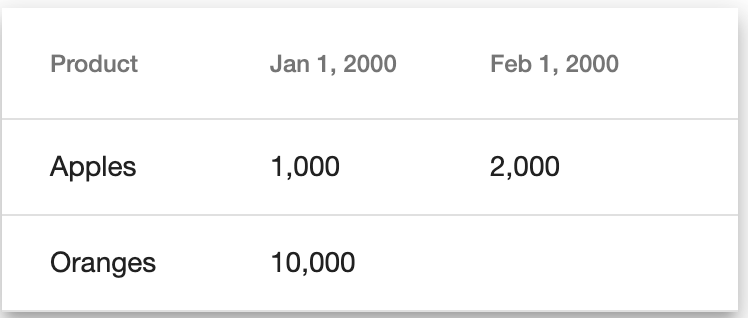
As a reminder, the key elements of the Angular Material Basic Spreadsheet are the component that displays individual orders. This component is used by an Angular Material table based table component that maps a number of orders onto the screen similar to a spreadsheet based on the date and product of the order, as shown below.
Testing Individual Order Component
The following is the code and template behind the individual order component.
order.component.ts
order.component.html
// order.component.ts
import { Component, OnInit, Input } from '@angular/core';

import { Order } from './order.model';

@Component({
  selector: 'app-order',
  templateUrl: './order.component.html',
  styleUrls: ['./order.component.css']
})
export class OrderComponent implements OnInit {
  @Input() order: Order;

  constructor() { }

  ngOnInit() {
  }

}
<!-- order.component.html -->
<ng-container *ngIf="order">{{ order.value | number }}</ng-container>
To figure out the tests that need to be written, let’s think about what could go wrong. Firstly, we could have forgotten to import something or setup something incorrectly. Next, we could have assumed that anyone that uses the component will always pass in an order. Thirdly, when an order is passed in, we could have forgotten to use the number pipe to display the value. The following specification tests for those three cases.
order.component.spec.ts
// order.component.spec.ts
import { TestBed, ComponentFixture } from '@angular/core/testing';

import { OrderComponent } from './order.component';
import { DebugElement } from '@angular/core';

describe('OrderComponent', () => {
  let fixture: ComponentFixture<OrderComponent>;
  let component: OrderComponent;
  let debugElement: DebugElement;

  beforeEach(() => {
    TestBed.configureTestingModule({
      declarations: [OrderComponent]
    });

    fixture = TestBed.createComponent(OrderComponent);
    component = fixture.componentInstance;
    debugElement = fixture.debugElement;
  });

  it('should create', () => {
    fixture.detectChanges();
    expect(component).toBeTruthy();
  });

  describe('order null', () => {
    it('should display empty template.', () => {
      // Setting order to null
      component.order = null;

      // Triggering change detection
      fixture.detectChanges();

      // Checking template
      expect(debugElement.nativeElement.textContent).toEqual('');
    });
  });

  describe('order not null', () => {
    it('should display order value formatted as number.', () => {
      // Setting order to null
      component.order = {date: '2000-01-01', product: 'product 1', value: 1000};

      // Triggering change detection
      fixture.detectChanges();

      // Checking template
      expect(debugElement.nativeElement.textContent).toEqual('1,000');
    });
  });
});
On lines 8-20 the standard setup for component tests is defined. The test on lines 22-25 checks that the component is created. The test on lines 27-38 checks what happens if the input Order is null. Finally, the test on lines 40-51 checks that the Order value is displayed using the number pipe.
Here the DebugElement is used to inspect the template. Since the template is relatively simple, we only ever check the text content of the whole template under the different test cases.
Testing Table Component
The following is the code and template for the order table component.
order-table.component.ts
order-table.component.html
// order-table.component.ts
import { Component, OnInit } from '@angular/core';

import { OrderTable } from './order-table.model';
import { OrderService } from './order.service';

@Component({
  selector: 'app-order-table',
  templateUrl: './order-table.component.html',
  styleUrls: ['./order-table.component.css']
})
export class OrderTableComponent implements OnInit {
  orderTable: OrderTable;
  productHeader = 'Product';
  headers: string[];

  constructor(private orderService: OrderService) { }

  ngOnInit() {
    this.orderTable = this.orderService.getOrderTable();
    this.headers = [this.productHeader].concat(this.orderTable.headers);
  }

}
<!-- order-table.component.html -->
<ng-container *ngIf="orderTable.rowLabels.length">
  <table mat-table [dataSource]="orderTable.rowLabels" class="mat-elevation-z8">
    <ng-container [matColumnDef]="header" *ngFor="let header of headers">
      <th mat-header-cell *matHeaderCellDef>
        <ng-container *ngIf="header === productHeader">{{ header }}</ng-container>
        <ng-container *ngIf="header !== productHeader">{{ header | date }}</ng-container>
      </th>
      <td mat-cell *matCellDef="let element">
        <ng-container *ngIf="header === productHeader">{{ element }}</ng-container>
        <ng-container *ngIf="header !== productHeader"><app-order [order]="orderTable.orderMap[header][element]"></app-order></ng-container>
      </td>
    </ng-container>

    <tr mat-header-row *matHeaderRowDef="headers"></tr>
    <tr mat-row *matRowDef="let row; columns: headers;"></tr>
  </table>
</ng-container>
The table component is more complex and will require more tests. Broadly, there are tests for the component class and for the template. The main test for the component class is that the getOrderTable function is called on initialisation. Ideally, component code is tested without the use of the TestBed as it tends to slow down tests. However, since the component code to be tested is linked to an Angular event (OnInit), in this case it is better to use the TestBed and, therefore, the standard Angular lifecycle functions. The template tests are complex due to the number of ngIf statements and other logic in the template. Additionally, there are some complexities testing Angular Material tables. The following is the test code that checks common cases.
order-table.component.spec.ts
// order-table.component.spec.ts
import { TestBed, ComponentFixture } from '@angular/core/testing';
import { Component, Input } from '@angular/core';
import { MatTableModule } from '@angular/material';

import { OrderTableComponent } from './order-table.component';
import { Order } from './order.model';
import { OrderService } from './order.service';

@Component({
  selector: 'app-order',
  template: `
    {{ order.date }}
    {{ order.product }}
    {{ order.value }}
  `
})
class TestOrderComponent {
  @Input() order: Order;
}

describe('OrderTableComponent', () => {
  let fixture: ComponentFixture<OrderTableComponent>;
  let component: OrderTableComponent;
  let nativeElement: HTMLElement;
  let orderServiceSpy: jasmine.SpyObj<OrderService>;

  beforeEach(() => {
    // Creating mock OrderService
    orderServiceSpy = jasmine.createSpyObj('OrderService', ['getOrderTable']);

    TestBed.configureTestingModule({
      declarations: [OrderTableComponent, TestOrderComponent],
      providers: [{provide: OrderService, useValue: orderServiceSpy}],
      imports: [MatTableModule]
    });

    fixture = TestBed.createComponent(OrderTableComponent);
    component = fixture.componentInstance;
    nativeElement = fixture.nativeElement;
  });

  describe('TestOrderComponent', () => {
    it('should create', () => {
      // Defining getOrderTable return value
      orderServiceSpy.getOrderTable.and.returnValue({
        headers: [],
        rowLabels: [],
        orders: [],
        orderMap: {}
      });

      // Triggering change detection
      fixture.detectChanges();

      // Checking component create
      expect(component).toBeTruthy();
    });

    describe('construction', () => {
      it('should call getOrderTable on OrderService', () => {
        // Defining getOrderTable return value
        orderServiceSpy.getOrderTable.and.returnValue({
          headers: [],
          rowLabels: [],
          orders: [],
          orderMap: {}
        });

        // Triggering change detection
        fixture.detectChanges();

        // Checking getOrderTable call
        expect(orderServiceSpy.getOrderTable).toHaveBeenCalledWith();
      });
    });

    describe('empty table', () => {
      it('should display empty template.', () => {
        // Defining getOrderTable return value
        orderServiceSpy.getOrderTable.and.returnValue({
          headers: [],
          rowLabels: [],
          orders: [],
          orderMap: {}
        });

        // Triggering change detection
        fixture.detectChanges();

        // Checking template
        expect(nativeElement.textContent).toEqual('');
      });
    });

    describe('single item table', () => {
      it('should display Product and date header', () => {
        // Defining getOrderTable return value
        const order = {
          date: '2000-01-01',
          product: 'product 1',
          value: 1
        };
        orderServiceSpy.getOrderTable.and.returnValue({
          headers: ['2000-01-01'],
          rowLabels: ['product 1'],
          orders: [order],
          orderMap: {'2000-01-01': {'product 1': order}}
        });

        // Triggering change detection
        fixture.detectChanges();

        // Checking headers in template
        const trs = nativeElement.querySelectorAll('tr');
        expect(trs.length).toEqual(2);
        const ths = trs.item(0).querySelectorAll('th');
        expect(ths.length).toEqual(2);
        ['Product', 'Jan 1, 2000'].forEach((expectedHeader, idx) => expect(ths.item(idx).innerText).toEqual(expectedHeader));
      });

      it('should display single row with Order', () => {
        // Defining getOrderTable return value
        const order = {
          date: '2000-01-01',
          product: 'product 1',
          value: 1
        };
        orderServiceSpy.getOrderTable.and.returnValue({
          headers: ['2000-01-01'],
          rowLabels: ['product 1'],
          orders: [order],
          orderMap: {'2000-01-01': {'product 1': order}}
        });

        // Triggering change detection
        fixture.detectChanges();

        // Checking headers in template
        const trs = nativeElement.querySelectorAll('tr');
        expect(trs.length).toEqual(2);
        const tds = trs.item(1).querySelectorAll('td');
        expect(tds.length).toEqual(2);
        ['product 1', '2000-01-01 product 1 1'].forEach((expectedItem, idx) => expect(tds.item(idx).innerText).toEqual(expectedItem));
      });
    });

    describe('multiple item table with single row', () => {
      it('should display Product and date headers', () => {
        // Defining getOrderTable return value
        const orders = [{
          date: '2000-01-01',
          product: 'product 1',
          value: 1
        }, {
          date: '2000-01-02',
          product: 'product 2',
          value: 2
        }];
        orderServiceSpy.getOrderTable.and.returnValue({
          headers: ['2000-01-01', '2000-01-02'],
          rowLabels: ['product 1'],
          orders: orders,
          orderMap: {
            '2000-01-01': {'product 1': orders[0]},
            '2000-01-02': {'product 1': orders[1]}
          }
        });

        // Triggering change detection
        fixture.detectChanges();

        // Checking headers in template
        const trs = nativeElement.querySelectorAll('tr');
        expect(trs.length).toEqual(2);
        const ths = trs.item(0).querySelectorAll('th');
        expect(ths.length).toEqual(3);
        [
          'Product', 'Jan 1, 2000', 'Jan 2, 2000'
        ].forEach((expectedHeader, idx) => expect(ths.item(idx).innerText).toEqual(expectedHeader));
      });

      it('should display single row with Orders', () => {
        // Defining getOrderTable return value
        const orders = [{
          date: '2000-01-01',
          product: 'product 1',
          value: 1
        }, {
          date: '2000-01-02',
          product: 'product 1',
          value: 2
        }];
        orderServiceSpy.getOrderTable.and.returnValue({
          headers: ['2000-01-01', '2000-01-02'],
          rowLabels: ['product 1'],
          orders: orders,
          orderMap: {
            '2000-01-01': {'product 1': orders[0]},
            '2000-01-02': {'product 1': orders[1]}
          }
        });

        // Triggering change detection
        fixture.detectChanges();

        // Checking headers in template
        const trs = nativeElement.querySelectorAll('tr');
        expect(trs.length).toEqual(2);
        const ths = trs.item(1).querySelectorAll('td');
        expect(ths.length).toEqual(3);
        [
          'product 1', '2000-01-01 product 1 1', '2000-01-02 product 1 2'
        ].forEach((expectedItem, idx) => expect(ths.item(idx).innerText).toEqual(expectedItem));
      });
    });

    describe('multiple item table with single column', () => {
      it('should display Product and date header', () => {
        // Defining getOrderTable return value
        const orders = [{
          date: '2000-01-01',
          product: 'product 1',
          value: 1
        }, {
          date: '2000-01-01',
          product: 'product 1',
          value: 2
        }];
        orderServiceSpy.getOrderTable.and.returnValue({
          headers: ['2000-01-01'],
          rowLabels: ['product 1', 'product 2'],
          orders: orders,
          orderMap: {'2000-01-01': {
            'product 1': orders[0],
            'product 2': orders[1]
          }}
        });

        // Triggering change detection
        fixture.detectChanges();

        // Checking headers in template
        const trs = nativeElement.querySelectorAll('tr');
        expect(trs.length).toEqual(3);
        const ths = trs.item(0).querySelectorAll('th');
        expect(ths.length).toEqual(2);
        ['Product', 'Jan 1, 2000'].forEach((expectedHeader, idx) => expect(ths.item(idx).innerText).toEqual(expectedHeader));
      });

      it('should display multiple rows with Orders', () => {
        // Defining getOrderTable return value
        const orders = [{
          date: '2000-01-01',
          product: 'product 1',
          value: 1
        }, {
          date: '2000-01-01',
          product: 'product 2',
          value: 2
        }];
        orderServiceSpy.getOrderTable.and.returnValue({
          headers: ['2000-01-01'],
          rowLabels: ['product 1', 'product 2'],
          orders: orders,
          orderMap: {'2000-01-01': {
            'product 1': orders[0],
            'product 2': orders[1]
          }}
        });

        // Triggering change detection
        fixture.detectChanges();

        // Checking headers in template
        const trs = nativeElement.querySelectorAll('tr');
        expect(trs.length).toEqual(3);
        let tds = trs.item(1).querySelectorAll('td');
        expect(tds.length).toEqual(2);
        ['product 1', '2000-01-01 product 1 1'].forEach((expectedItem, idx) => expect(tds.item(idx).innerText).toEqual(expectedItem));
        tds = trs.item(2).querySelectorAll('td');
        expect(tds.length).toEqual(2);
        ['product 2', '2000-01-01 product 2 2'].forEach((expectedItem, idx) => expect(tds.item(idx).innerText).toEqual(expectedItem));
      });
    });
  });
});
The test setup is done on lines 23-41. The tests on lines 43-76 check the code of the component. The tests on lines 78-286 check the template under a range of scenarios.
Test Setup for Angular Material Table
There are a few interesting pieces to highlight for the tests. As the OrderTemplateComponent has a dependency on the OrderComponent, it needs to be given to the TestBed along with the OrderTableComponent. For testing, it is better to define a mock implementation of the component rather than use the real component, which is done on lines 10-20.
At the time of writing, the DebugElement does not work with the Angular Material table. This means that, to figure out exactly which OrderComponent is displayed in a cell, we need to make use of the template. Each OrderComponent displays an Order. Therefore, it should be enough to display all the member variables of the Order in the template of the mock OrderComponent to know that the correct Order was passed.
Since the template of the OrderTableComponent makes use of the Angular Material table, we need to pass in the MatTableModule to the TestBed.
Component Code Tests
The tests on lines 43-76 check that the component can be constructed and that the getOrderTable function is called on the OrderService during component initialisation. In this case, the component create test is a little more complicated because the OrderService needs to be called during initialisation which means that the getOrderTable function must at least exist. Also, during the initialisation, the headers member variable is used on the returned value of getOrderTable, so we may as well return an empty OrderTable.
Component Template Tests
The main reason for the length of the tests are the definition of the OrderTable to display in each test. There is a trade off between pre-defining or repeatedly defining them in each test. In production code brevity is preferred, so it is often better to define a range of OrderTables and importing them. However, for tests, it is better to have a single test be as much of a complete story as is needed to understand the test. As what is displayed in the template is tightly linked to the OrderTable, there are significant advantages to explicitly stating the OrderTable in each test.
The test scenarios are an empty table, a single item table and tests where either multiple columns or rows are displayed. In each case, the headers and rows are checked.
With these tests you have made an important step towards being able to scale up the complexity of the website. Now it is time to work on additional features! The most important feature request your manager has made is to make the spreadsheet editable so that people can revise the orders that were placed over time.
 David Andersson